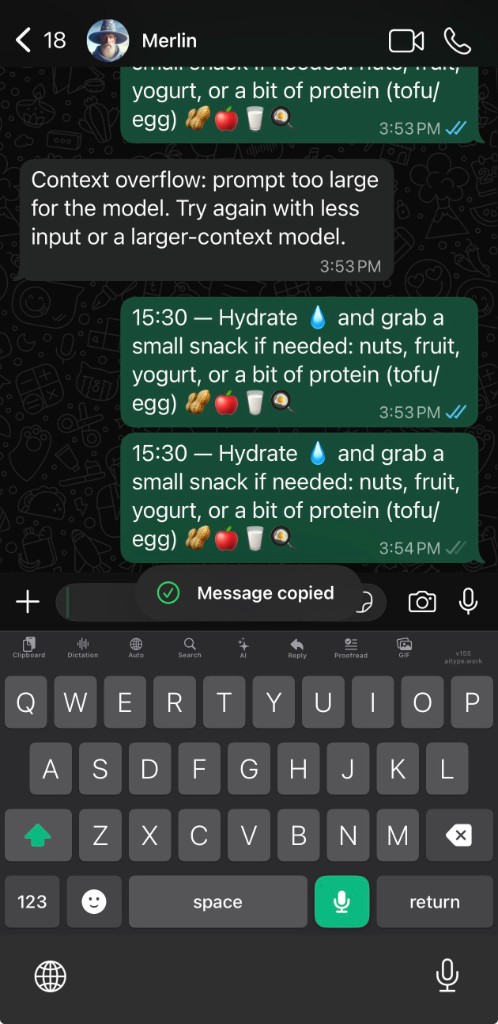
AiType now lives inside the conversation.
Use the real keyboard directly in chat: swipe when typing is faster, tap Mic and then tap Stop to dictate, tap Reply for a suggested answer, run quick AI rewrites, keep saved clipboard and voice history one tap away, search contacts, switch languages from settings and the toolbar, and paste GIFs or emoji without leaving the conversation. The same core flow now ships across iPhone and Android.
~250ms transcription
Powered by Groq's custom silicon running Whisper. Finish speaking, stop dictation, and text appears in about a quarter of a second, 5× faster than standard cloud STT.
Cleanup and rewrite that stays useful
AiType can clean up filler fast or do a smarter rewrite when you need a cleaner, send-ready version without losing the original point. It also fixes punctuation, capitalisation, wording, and formatting automatically, which is especially useful for dyslexic users and anyone who wants the result to look polished without manually editing every line.
100+ languages
AiType can follow multilingual speech, so switching languages feels like part of the same workflow instead of a settings task.
Per-app tone
Email can stay polished, chat can stay concise, and editor prompts can stay technical. Cleanup follows the app you are in.
Private by default
AiType only processes the dictation you choose to send. It does not read the rest of what you type on your computer.
Saved clipboard
Keep favorite clips close, import copied lists in one go, and re-paste the things you use all the time without rebuilding them from scratch.
Swipe typing
When speaking out loud is awkward, glide across the keys and keep moving. AiType now supports swipe-style input right inside the mobile keyboard, including a more familiar Gboard-style flow on Android.
Voice history
Every dictation is saved so you can scroll back, tap to reuse, or swipe to delete. Your spoken drafts stay one tap away until you clear them.
GIFs and emoji
Search GIFs, browse a proper visual gallery, and paste them straight into chat. Emoji search is built in too, so you do not have to switch keyboards.
Suggested replies
Copy the messages you received, tap Reply, and AiType drafts a short natural answer you can send as-is or tweak.
Contact search
Search real phone contacts from the keyboard and paste the right email, number, or detail without leaving the conversation you are in.
How it works
Hold the shortcut
Press and hold the Fn key (or your custom shortcut). AiType starts listening immediately - no click, no mode switch, no separate window to manage.
Speak naturally
Say what you mean in your own words. Filler words, false starts, and rough phrasing are fine - cleanup handles that. Just get the thought out.
Release and it types
Let go of the key. AiType transcribes, cleans up, and types the result directly into whatever app you were using - email, Slack, a doc, a code editor, anything.
Start with AiType
Download the app, sign in with email, and start dictating immediately. On mobile, plans are shown inside the App Store or Google Play.